How to Collect Unlimited Leads From Instagram (Free Methods + Tools)
Every business on Instagram sits on top of a lead list it never collects. The people commenting on a competitor’s post, the accounts using a niche hashtag, the followers of a similar business — those are named, reachable prospects, and most of them will never hear from you because collecting them by hand is slow, dull work.
This guide shows you how to collect leads from Instagram at scale — the six sources worth mining, how to gather them without getting your account flagged, how to keep the lists clean, and where automation turns a two-hour job into a two-minute one. Everything here works whether you collect manually or with a tool.
Quick answer: To collect unlimited leads from Instagram, pull usernames from one source at a time — a hashtag, a location tag, a competitor’s followers or following, or the likers and commenters of a specific post. Gather them on slow, human-like delays (1–4 seconds between actions), filter out accounts that don’t fit, and save each batch as a named, reusable list. A Chrome extension like IG Outreach Desk automates the collecting so you can build audiences of hundreds of qualified leads per source, hands-off.
What counts as an Instagram lead?
A lead is not just any username. It is an account that has shown some signal of being your kind of customer — and Instagram, more than almost any platform, puts those signals out in the open.
Someone who commented on a post about the exact problem you solve is a strong lead. Someone who follows three of your competitors is a strong lead. A random account that happened to like a viral reel is a weak one. The whole skill of collecting leads from Instagram is choosing sources where the signal is high, so that the list you build is worth the time you will spend contacting it.
Keep that in mind through the rest of this guide: quantity is easy, quality is the whole game. A tightly targeted list of 200 always outperforms a scraped list of 2,000.
The 6 places to collect leads from Instagram
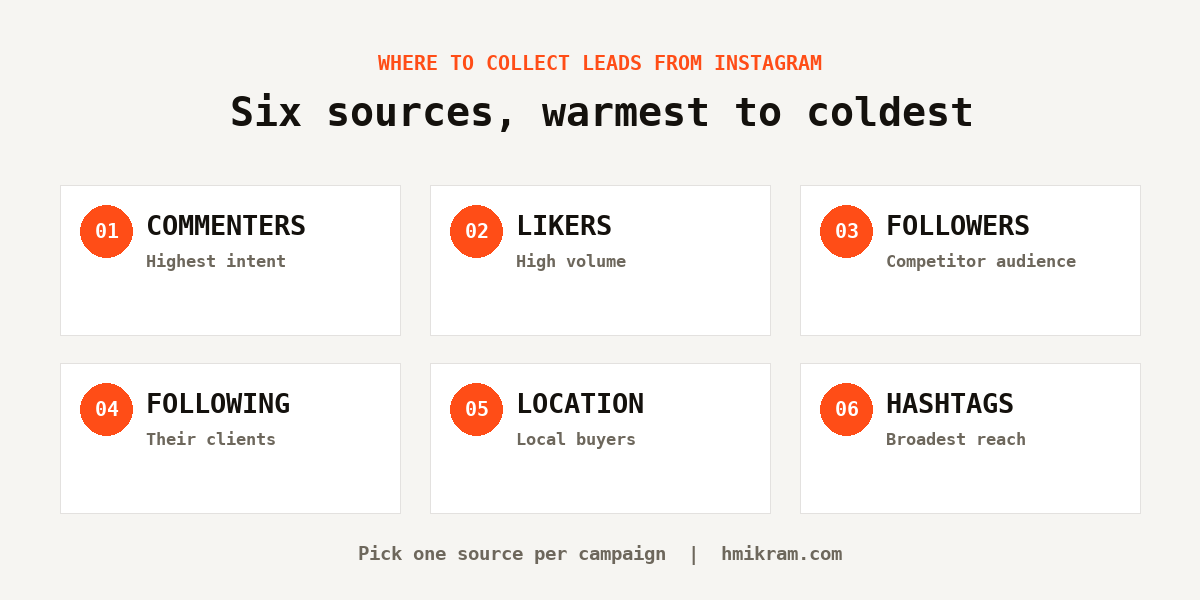
These are the six sources worth mining, ranked roughly from warmest to coldest. Pick one per campaign — mixing them produces a list you cannot write a sharp message for.
1. Commenters on a relevant post
The strongest source, and the one almost nobody uses. Commenting takes effort, so it is a genuine signal of interest. Find a post that speaks directly to your market — a competitor’s announcement, an industry account’s question, a piece of local news — and collect everyone arguing in the comments.
2. Likers of that same post
A weaker signal per person, but far more of them. Likers work best when the post is narrow: everyone likes a pretty photo, but only your buyers like a post about the specific thing you sell.
3. A competitor’s followers
People who follow a business like yours have already identified themselves as your market. Pick competitors your own size rather than the category leader — a peer’s following is full of real customers, while a big brand’s is full of fans and other businesses.
4. Accounts a competitor follows
Overlooked and often excellent. Businesses tend to follow their own clients, suppliers and local partners, so the following list is frequently a short, high-quality roster.
5. Location tags
Essential if you sell locally. Search the specific places your buyers post from — a venue, a trade centre, a suburb — rather than the whole city, and stack location with a niche hashtag for a sharper list.
6. Hashtags
The highest-volume source and the lowest-precision one. Avoid the millions-of-posts tags; the useful ones sit in the tens of thousands, specific enough that only practitioners use them. Look at what your existing clients tag their own posts with.
For a deeper breakdown of choosing between these, see the full guide to getting clients from Instagram, which covers what to do with the leads once you have them.
Collecting by hand vs with a tool
You can collect from every source above manually. It is just slow, and slow work is work you eventually stop doing. Here is the honest comparison.
| Collecting by hand | Collecting with a tool | |
|---|---|---|
| Speed | 20–40 usernames per hour of scrolling | 300+ per source, hands-off |
| Consistency | Drops to zero on busy weeks | Runs regardless of workload |
| Duplicate handling | Manual, easy to lose track | Automatic across every list |
| Saving and reuse | Spreadsheets you forget to update | Named audiences, reusable anytime |
| Export | Copy-paste, error-prone | One-click CSV |
| Cost | Your time | A tool, often one-time |
The manual method is the right place to start — collect a hundred names by hand so you learn which sources produce replies before you scale. The moment the repetition becomes the thing you keep skipping, that is when a tool earns its place.
How to collect leads safely without a ban
Collecting is far safer than engaging — you are reading public data, not performing actions on other accounts — but Instagram still watches for behaviour that looks like software. A few rules keep you clear.
- Use slow delays. Around 1–4 seconds between collecting actions looks like a person browsing. Instant, machine-speed scraping is the fastest way to get rate-limited.
- Stay in your own logged-in session. Tools that ask for your password and log in from a foreign server are the ones that trigger security flags. A browser extension that works inside your normal session is far safer.
- Don’t collect for sixteen hours straight. Work in sessions, the way a real person does.
- Separate collecting from messaging. Gather your list, then contact it later on its own slower schedule. Direct messages are policed far harder than collecting is.
Automation always carries some risk, and staying within Instagram’s terms of service is your responsibility. For the full set of safe hourly limits and delay ranges, see the safe-limits section of the outreach guide. Instagram’s own Help Center is the authority on what is permitted.
Keeping your lead lists clean and reusable
Collecting is only half the job. A raw scrape is full of accounts you should never contact, and a list you cannot find again next month is a list you will rebuild from scratch.
Filter before you save. Drop the obvious misfits — personal accounts if you sell B2B, other agencies in your niche, dormant profiles, the follow-for-follow crowd. Cutting 300 names to 180 is not lost work; it raises your reply rate and lowers your chance of being reported.
Name every list properly. Save it as something like detailers-brisbane-july, not list2. In three months you will want to know which source produced paying customers, and you cannot answer that if every file has the same name.
Keep a blacklist. Existing clients, competitors, and anyone who already declined belong on a do-not-contact list that every future campaign respects.
Is “unlimited” lead collection really possible?
Practically, yes — with an honest asterisk.
There is no cap on how many usernames you can collect over time. New posts, new hashtag activity and new followers appear every day, so the supply genuinely refreshes faster than you can work through it. In that sense the pool is effectively unlimited, and a good tool will let you build list after list without a ceiling on saved audiences.
What is not unlimited is how fast you should collect in a single burst, or how many people you should message per hour afterwards. Those have safe ceilings, and respecting them is what keeps the account that does the collecting alive. “Unlimited leads” is true over weeks and months; it is not a licence to scrape ten thousand accounts in an afternoon.
IG Outreach Desk is the Chrome extension I built for exactly this. It collects from all six sources above, saves each batch as a reusable named audience with duplicate protection, exports to CSV, and runs on the slow human-like delays that keep collecting safe — all inside your normal logged-in session, as a one-time purchase rather than a subscription.
What to do after you collect leads from Instagram
Collecting is the start, not the finish. A saved list only becomes revenue when you actually reach the people on it — so plan the next step before you gather a single username.
The pattern that works is warm-then-ask. Once you collect leads from Instagram and save them as an audience, spend a day or two engaging lightly — a like here, a follow there — so your name is familiar before you appear in the inbox. Then message the same list on a slow, natural cadence. A direct message from a familiar account is a conversation; the same message from a stranger is an interruption.
This is also why a clean, well-named list matters so much. When you come back to a saved audience a week later to message it, you want to know exactly where it came from and that nobody on it has been contacted before. Collect deliberately now and every downstream step gets easier.
Frequently asked questions
How do I collect leads from Instagram for free?
Manually, at no cost beyond your time. Open a relevant hashtag, competitor account, or post, and copy the usernames of the people engaging into a spreadsheet. It works and it is free — the only limit is how many you can gather by hand before the repetition wears you down.
Is it legal to collect leads from Instagram?
Collecting publicly visible usernames is broadly comparable to noting down public information, but automated collection can conflict with Instagram’s own terms of service, and how you then use the data is subject to privacy laws like GDPR in some regions. Collect responsibly, contact people relevantly, honour opt-outs, and treat Instagram’s terms as the boundary.
How many leads can I collect from Instagram in a day?
By hand, a few hundred if you are dedicated. With a tool on safe delays, several hundred per source across a few sessions — enough to keep a full outreach pipeline supplied without collecting so fast that you trip Instagram’s rate limits.
What is the best tool to collect Instagram leads?
The best tool runs inside your own browser session rather than logging in from a remote server, uses adjustable human-like delays, removes duplicates automatically, and lets you save and reuse named lists. IG Outreach Desk was built around exactly those principles as a one-time-purchase Chrome extension.
Can I export the leads I collect?
Yes, if your tool supports it. Being able to export a collected audience to CSV means you can reuse the list in other software, keep a backup, and analyse which sources produced the best customers over time.
Do I need a big following to collect leads?
No. Collecting leads has nothing to do with your own follower count — you are gathering other people’s public data. A credible profile helps when a prospect checks you out, but you can build lead lists from day one with zero followers.
Start with one source this week
The mistake most people make is trying to collect from everywhere at once and ending up with a broad, unusable list. Pick a single source — the commenters on one perfectly relevant post is a great start — gather a couple of hundred names, filter them, and save the batch with a clear name.
Do that consistently and you will never run short of people to reach. When collecting by hand becomes the chore you keep putting off, IG Outreach Desk was built to run exactly this process for you, safely and without a ceiling.