How to Get Clients From Instagram: A Proven 10x Outreach System
If you want to get clients from Instagram, the bottleneck is rarely your offer or your content. It is volume. Most freelancers and agencies send somewhere between ten and thirty manual DMs on a good day, then stop — because opening profiles, copying names and retyping the same message is exhausting work that produces no output on the days you skip it.
This guide breaks down the exact system for reaching ten times more of the right people on Instagram, without spamming anyone and without putting your account at risk. It covers where qualified leads actually live on the platform, how to sequence engagement so your DMs get read, the hourly limits that keep you safe, and the mistakes that get accounts restricted.
Quick answer: To get clients from Instagram at scale, build a narrowly targeted list from one source (a hashtag, a location tag, or a competitor’s followers), warm each account with a like or follow for a day or two, then send a short personalised DM that ends in an easy question. Automate the mechanical steps on randomised delays — roughly 60–80 seconds between engagement actions and 40–70 seconds between messages — and keep DMs under about 50 per hour. The volume increase is what produces the 10x; the targeting is what produces the replies.
- What “10x more clients” actually means
- Why manual Instagram outreach caps out
- The 5-step system to get clients from Instagram
- Safe automation limits (and why they matter)
- How long it takes to get results
- Instagram outreach vs email and ads
- What to look for in an outreach tool
- Five mistakes that kill results
- Frequently asked questions
What “10x more clients” actually means
Let us be precise, because vague promises are how people end up disappointed.
Instagram outreach is arithmetic with a quality multiplier. If you contact 20 well-chosen people a day and 8% reply, you get roughly 1.6 conversations. Contact 250 equally well-chosen people and the same 8% gives you 20 conversations. The reply rate did not change. The volume did.
So the honest version of “10x” is this: automation multiplies your outreach volume, not your conversion rate. Ten times the sends against the same quality of list produces roughly ten times the conversations. What happens after that — whether those conversations become clients — still depends on your offer, your pricing and how you handle a reply.
This matters practically, because it tells you where to spend your effort. Automating a bad list simply produces failure faster. Get the targeting right first, then scale it.
Why manual Instagram outreach caps out
Manual outreach fails for a structural reason, not a motivational one. The work is repetitive, unmeasured and easy to postpone — so it becomes the first thing dropped whenever client work gets busy. That produces the feast-and-famine cycle most freelancers know well: a frantic prospecting week, a full pipeline, two months of silence, then panic.
There is also a tracking problem. After a few hundred manual messages nobody remembers who was contacted, who replied, or which source produced the best conversations. Without that record you cannot improve, and you will eventually message the same person twice — which reads as careless at best.
| Manual outreach | Automated outreach | |
|---|---|---|
| Leads collected | 20–40 per hour of scrolling | 300+ per source, hands-off |
| DMs sent per day | 10–30 before fatigue | 200–400 on natural delays |
| Consistency | Drops to zero on busy weeks | Runs regardless of workload |
| Duplicate protection | Memory and a spreadsheet | Automatic across campaigns |
| Source tracking | Rarely recorded | Saved per audience |
| Your time | 2–3 hours daily | ~20 minutes replying |
The 5-step system to get clients from Instagram
This is the loop. It works whether you run it by hand or automate it — automation only changes how long each step takes.
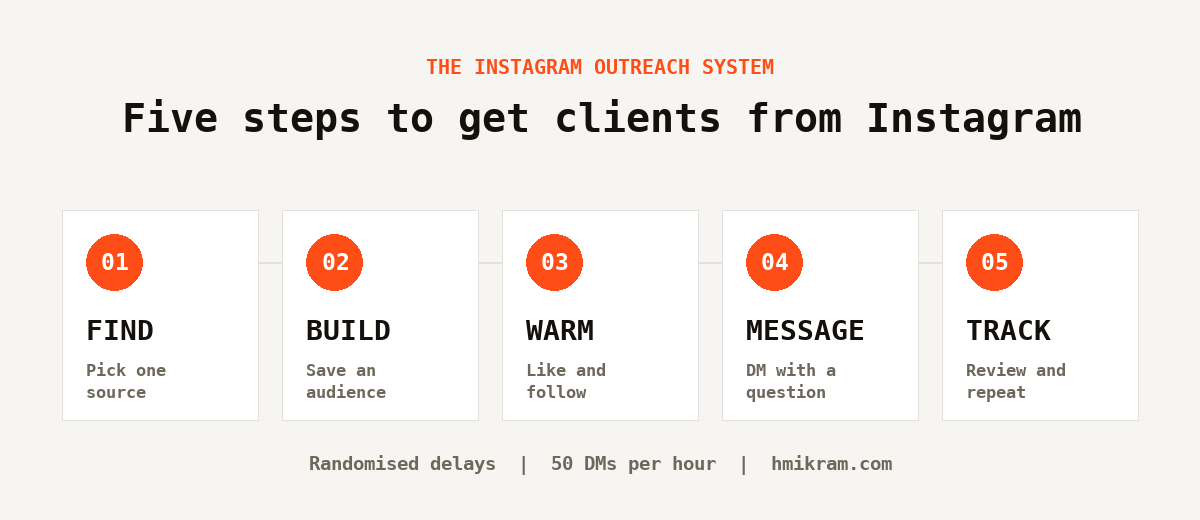
Step 1: Find where your buyers already are
Instagram is unusually generous about revealing intent. There are six sources worth mining, and they are not equally valuable:
- Commenters on a relevant post — the strongest signal available. Commenting takes effort, so it filters for genuine interest.
- Likers of that same post — weaker per person, but far more of them.
- A competitor’s followers — people who already identified themselves as your market.
- Accounts a competitor follows — often their actual clients and suppliers. Small list, high quality.
- Location tags — essential for local services, useless otherwise.
- Hashtags — highest volume, lowest precision. Use specific ones in the tens of thousands of posts, not the millions.
Pick one source per campaign. Mixing them produces a list you cannot write a sharp message for — copy written for a single hashtag’s audience reads as personal, while copy written for a blend of six sources reads as generic.
Step 2: Build and save a targeted audience
Collect the accounts, then filter out the obvious misfits — personal accounts if you sell B2B, other agencies in your niche, dormant profiles. Trimming 300 names to 180 is not lost work: it raises your reply rate and lowers your chance of being reported.
Save the result as a named list — detailers-brisbane-july, not leads2. In three months you will want to know which source produced paying clients, and you cannot answer that if every file has the same name.
Step 3: Warm the account before you message
This is the step almost everyone skips, and it changes the odds more than any other.
A DM from a completely unknown account is an interruption. A DM from someone who liked two of your posts yesterday is a familiar name. Same words, very different reception. So spend a day or two engaging — a couple of likes, a follow, an occasional genuine comment — and only then send the message.
Step 4: Send DMs that earn a reply
Keep it short enough to read without tapping “more”, and structure it in four moves:
- A specific observation that could not have been mass-produced.
- A bridge connecting what you noticed to a problem they likely have.
- One line of relevant proof — a single result, not your life story.
- A small question they can answer in four words.
That last move is where most people overreach. “Do you have 30 minutes Thursday?” asks a stranger for a commitment. “Are you handling bookings through DMs at the moment?” asks for a fact — and a reply to that is a conversation.
Step 5: Track results, then double down
Every Friday, five minutes and three questions: which audience produced the most replies, which message performed best, and where did people stop responding? Then change one variable next week. Change four at once and you learn nothing from the outcome.
Safe automation limits (and why they matter)
Instagram is not primarily counting your actions. It is watching whether you behave like software. Perfectly even timing is the loudest tell there is — a person does not perform an action every 30.0 seconds for four hours straight.
These are sensible ceilings for an established, warmed-up account. Treat them as maximums, not targets for day one:
| Action | Safe ceiling (per hour) | Delay between actions |
|---|---|---|
| Likes | Up to ~350 | 60–80 seconds |
| Follows | Up to ~200 | 60–80 seconds |
| Comments | Up to ~180 | 60–80 seconds |
| Direct messages | ~50 | 40–70 seconds |
| Collecting leads | No practical limit | 1–4 seconds |
Notice how far DMs sit below everything else. Messaging is the action Instagram polices hardest, because it is what spammers abuse most. If you take one number from this article, take that one.
New or dormant accounts should start at roughly a quarter of these figures and climb over two weeks. And if you see “Action blocked”, follows silently failing, or a sudden drop in reach, stop for 24–48 hours and resume at half your previous pace. Instagram’s own Help Center is the authority on what is permitted — automation always carries some risk, and staying within the platform’s terms is your responsibility.
How long does it take to get clients from Instagram?
Faster than most channels, but not instantly — and the first fortnight looks deceptively quiet. Here is a realistic schedule if you are starting from a cold account.
Week one is warm-up. You are running at a quarter of the safe limits, building your first audience and testing whether your message gets read at all. Expect a handful of replies. The goal here is not volume; it is proving the list is right before you scale it.
Weeks two and three are the ramp. Volumes climb toward the ceilings, and this is usually when the first real conversations arrive. If your list is well chosen you should see a reply rate somewhere between five and ten percent. Below that, the problem is almost always targeting rather than copy.
Month two is where it compounds. By now you have several saved audiences, you know which source produces the best conversations, and you are following up on people who did not answer the first time. Most of the people I know who consistently get clients from Instagram say their second month produced several times what the first did — not because they worked harder, but because they stopped starting over.
The failure mode is quitting in week one because nothing happened. Outreach is a lagging indicator: the work you do this week shows up in next month’s calendar.
Instagram outreach vs cold email and paid ads
Instagram is not automatically the best channel — it is the best channel for particular businesses. Here is how it compares to the two obvious alternatives.
| Instagram outreach | Cold email | Paid ads | |
|---|---|---|---|
| Cost to start | Time, plus a one-off tool | Domain and sending tools | Ad budget from day one |
| Time to first reply | Days | Days to weeks | Hours, if the offer lands |
| Targeting precision | Very high — you see the business before contacting it | Depends on list quality | Broad interest targeting |
| Best for | Visual and local businesses, creators, services | Corporate and B2B | Proven offers with budget |
| Stops when you stop | Yes | Yes | Immediately |
The reason so many service businesses get clients from Instagram rather than through email is simply that the qualification happens before you make contact. You can look at a profile and know within seconds whether that business needs what you sell — their work is on display, their location is tagged, and their follower count tells you roughly what they can afford. No email list gives you that.
The honest weakness is that outreach stops the moment you stop. Ads and content keep working while you sleep in a way that manual prospecting never will. The strongest position is to use outreach to fund the slower channels — book clients now, and put some of that revenue into content and ads that compound later.
What to look for in an Instagram outreach tool
Most tools that get accounts banned share the same flaws. Check for these five things:
- Minimum and maximum delays, not a single fixed value. A range looks human; a constant is a fingerprint.
- Per-action hourly caps you control, so you can ramp up rather than starting at full speed.
- Duplicate protection that remembers who was contacted across campaigns.
- A blacklist for existing clients, competitors and anyone who has already declined.
- It runs in your own browser session — tools that ask for your Instagram password and log in from a foreign server are the ones that trigger security flags.
That last point is why IG Outreach Desk is built as a Chrome extension rather than a cloud service. It works inside your normal logged-in session, collects leads from all six sources above, saves them as reusable audiences, and runs likes, follows, comments and DMs on randomised delays with the limits and protections described here. It is a one-time $29 purchase rather than a subscription.
Five mistakes that kill results
- Automating a broad list. Irrelevant outreach gets reported, and no delay setting protects an account from a pile of spam reports.
- Messaging before engaging. Skipping the warm-up step costs you replies for no saved time.
- Leading with a pitch. The first line exists to prove the message is not mass-produced. Nothing else.
- Starting at full speed. A brand-new account running 350 likes an hour on day one is the classic ban story.
- Never following up. Most replies come from the second message. Send one more, adding something useful — then stop.
Frequently asked questions
How many clients can you realistically get from Instagram?
It depends entirely on your list quality and offer, but the arithmetic is predictable. At 200 targeted DMs a day with a 5–10% reply rate, you can expect roughly 10–20 conversations daily. What share of those become clients is determined by your pricing, your niche and your follow-up — not by the tool sending the messages.
Is Instagram automation safe?
It carries risk, and anyone who tells you otherwise is selling something. The risk becomes small when three things are true: actions run on randomised rather than fixed delays, hourly volumes stay within the ceilings above, and you only contact people plausibly interested in what you sell. Most bans come from speed and irrelevance, not from automation itself.
How many DMs can I send per day on Instagram?
Around 50 per hour is a sensible ceiling for an established account, which works out to a few hundred per day across sessions. New accounts should start far lower — around 10–15 per hour — and increase gradually over two weeks. DMs are policed more aggressively than any other action.
What is the best way to find clients on Instagram?
Commenters on a post that speaks directly to your market are the highest-intent source, followed by that post’s likers, then a similar-sized competitor’s followers. Hashtags produce the most names but the least qualified ones. Narrow lists consistently outperform broad ones.
Do I need to buy followers or grow my account first?
No. Outreach does not depend on your follower count. It helps to have a profile that looks credible when someone checks it — a clear bio explaining who you help, a few examples of work, and a link that goes somewhere useful — but you do not need an audience to start booking conversations.
Does automation work for local businesses?
Particularly well, because location tags let you target by actual geography rather than guesswork. Search the specific places your buyers post from — a trade centre, a suburb, a venue — instead of the whole city, and combine location with an industry hashtag for a sharper list.
How much does it cost to get clients from Instagram?
Close to nothing beyond your time. Unlike ads there is no per-click cost, and unlike cold email there are no sending tools or warmed domains to pay for. The only real expense is whatever you use to automate the mechanical steps — IG Outreach Desk is a one-time $29 purchase rather than a monthly subscription, which means the cost per client falls every month you keep using it.
Can I get clients from Instagram without automation?
Absolutely, and you should start that way. Send thirty messages by hand before automating anything — it is the fastest way to learn whether your list and your message actually work. Automation is worth adding at the point where the manual version has proven itself and the repetition is the only thing stopping you doing it consistently.
Start with the list, not the tool
If you take one thing from this guide, make it this: the reason most people fail to get clients from Instagram is not that they lack automation. It is that they message the wrong people inconsistently, and stop before the numbers have a chance to work.
Fix the targeting, run the loop every week, and let volume do what volume does. When the manual version of the loop becomes the thing you keep skipping, that is the moment to automate it — and IG Outreach Desk was built to run exactly this system while you get on with client work.